Using JIRA with SpecShip: a step-by-step walkthrough
Read 9 min
Specs are nodes with edges to the code that satisfies them. Rename that code and the edge breaks — which is exactly the signal you want, landing in a review queue instead of silently shipping.
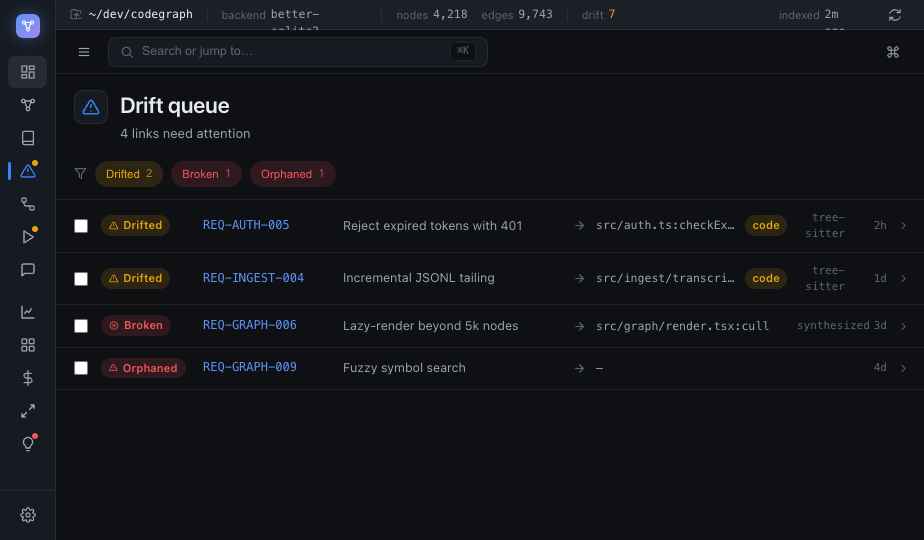
Here's a failure mode every team with a spec eventually hits: a requirement says the right thing, a test passes, the dashboard shows a reassuring green "verified" — and the code underneath no longer does what the requirement claims. The words and the behaviour have drifted apart, and nothing told you.
It usually starts with something innocent. Someone renames a field, splits a function, moves a handler to a new module. The refactor is correct. The test suite is green. But a requirement that pointed at the old symbol is now pointing at nothing — or worse, at something that looks similar and isn't.
SpecShip treats a requirement as a first-class node in the same graph as your code. You write it in plain Markdown with a stable ID and an RFC-2119 keyword in the title — MUST, SHOULD, MAY — and link it to the symbols that satisfy it. That link isn't a comment or a wiki entry; it's an edge, and it carries state.
<!-- id: REQ-AUTH-005 -->
## Sessions MUST reject an expired token

implementations:
  - src/auth/session.ts:validateSession
The interesting part isn't the link existing — it's what the link remembers. When SpecShip resolves REQ-AUTH-005 to validateSession, it snapshots the symbol's signature. On the next sync, it re-resolves and compares.
Three things can happen to that edge, and the graph names each one:
That's the whole trick. A renamed field didn't break a test — but it did change the signature of the function a "verified" requirement was pinned to, and that flips the link to drifted. The mismatch surfaces the instant the index syncs, not three releases later when someone notices the docs are lying.
Drift isn't a new kind of bug. It's the gap between intent and code, finally given a place to show up.
Drifted and broken links don't fail your build by default — most drift is benign and just needs a glance. Instead they land in a review queue a non-coder can work: each row shows the requirement, the symbol it pointed at, and what changed. You confirm it still holds (back to verified), or you fix the link, or you fix the code. States you've confirmed are sticky, so a later re-index doesn't quietly undo your judgement.
A human refactoring tends to remember the requirement they're touching. An agent refactoring across forty files does not — it optimizes for the test suite, which says nothing about whether your stated contract still holds. Drift detection is the safety rail for exactly that: the requirements don't have to be re-read to stay honest, because the graph re-checks them every time the code moves.
The day a renamed field broke a "verified" requirement, it took about a second to find out — because the requirement was a node, the link had a memory, and the mismatch had somewhere to go.