Using JIRA with SpecShip: a step-by-step walkthrough
Read 9 min
Managed, user, project, and subdirectory memory all stack — with @imports resolving across them. When the agent surprises you, the answer is usually a line you forgot was in scope.
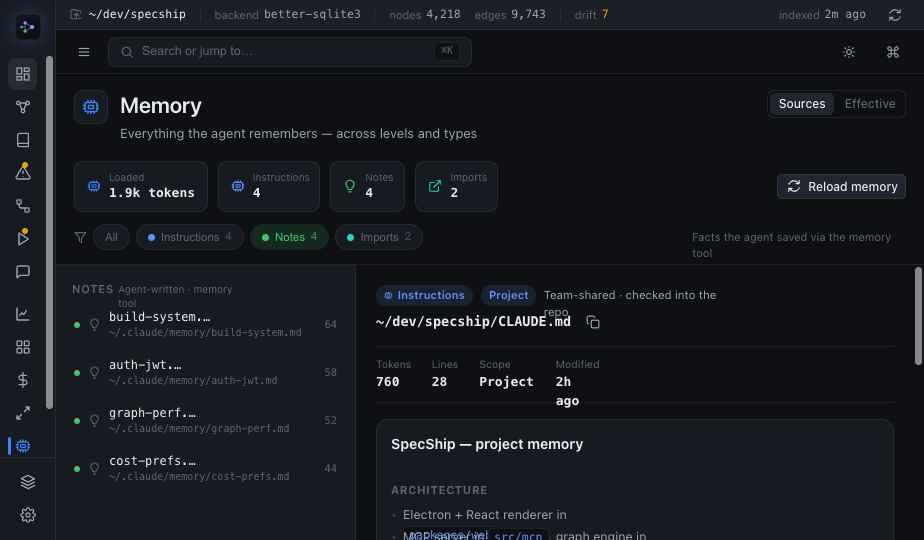
You ask the agent for something simple and it does something subtly off — uses a library you stopped using, follows a convention you abandoned, refuses a thing you never told it to refuse. The instinct is to blame the model. The answer is almost always a line of memory you forgot was in scope.
Claude Code doesn't read one instructions file. It reads a hierarchy, and every level is live at once:
~/.claude/CLAUDE.md, applied in every project you open.CLAUDE.md, checked into git, shared with your team.CLAUDE.md that only applies under its folder.The agent's behaviour in any given turn is the sum of all of these — not the one file you happened to edit. A rule three levels up that you wrote months ago and a teammate's project rule you've never read are both shaping the same response. When the result surprises you, the cause is usually a level you weren't looking at.
# project rules, plus a pulled-in fragment
@import ./docs/conventions.md

# …expands inline, so its rules are in scope too
And it's not just the four files. @import pulls other documents inline, so a convention doc you forgot links into your CLAUDE.md is, for the agent, simply part of the instructions. The effective prompt is bigger than any single file you can open.
SpecShip's Memory page resolves the entire hierarchy the way the agent does — every level, with @imports expanded, plus the free-form notes under ~/.claude/memory/ — and shows it as one view. Instead of opening four files in four places and resolving imports in your head, you read the actual, effective set of instructions in scope for this project, with each rule attributed to the level it came from.
The agent isn't ignoring your instructions. It's following all of them — including the ones you forgot you wrote.
Once the hierarchy is legible, "why did it do that?" becomes a lookup instead of a guess. You scan the resolved set, find the line responsible, and decide where it should live — promote a personal rule to the project, scope a broad rule to a subdirectory, or delete one that's outlived its purpose. Memory stops being a pile of files you hope are consistent and becomes something you can actually reason about — which is the whole point of writing it down in the first place.